Every business deals with documents that need signatures. Contracts, proposals, onboarding forms, purchase orders, and compliance documents all require approval from multiple people before they become official. When these documents move through email attachments, printed copies, and manual follow-ups, the process slows down considerably. Employees spend valuable time printing, scanning, emailing, and tracking down signatures instead of focusing on higher-value work.
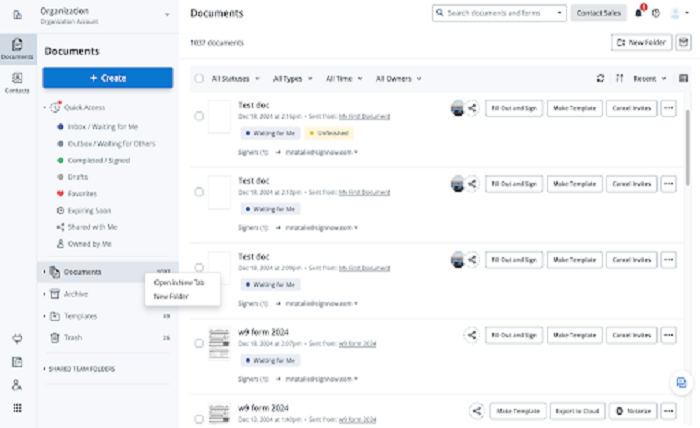
That is why many organizations are turning to electronic signature platforms. A tool like eversign esignature replaces the manual back-and-forth with a streamlined digital workflow. You upload a document, place signature fields where they are needed, add recipients, and send. The platform handles the routing, reminders, and recordkeeping automatically. What used to take days can happen in hours, and the completed document arrives with a full audit trail attached.
How Does an Electronic Signature Workflow Actually Operate?
An electronic signature workflow follows a simple sequence from start to finish. The sender uploads a document in PDF, Word, or image format into the platform. Then they drag and drop signature fields, date fields, initials fields, and text boxes onto the pages where signers need to interact.
Once the fields are placed, the sender enters the recipients’ names and email addresses. The platform sends each recipient an email invitation with a link to the document. The recipient clicks the link, reviews the document on their browser or mobile device, and applies their signature by typing, drawing, or uploading an image of their handwritten signature.
After all recipients have signed, the platform finalizes the document. It applies a tamper-evident seal, generates a completion certificate, and stores the signed file with a detailed audit trail. The sender receives a notification, and all parties can download the final signed copy. The entire process takes minutes instead of the days that paper-based signing typically requires.
What Types of Business Documents Benefit Most from eSignature?
Employee onboarding packages are among the most common documents that benefit from electronic signatures. Offer letters, confidentiality agreements, tax forms, and benefit enrollment documents can all be sent as a single signing packet. The new hire completes everything from home before their first day, and HR receives all signed documents organized in one place.
Sales contracts and proposals benefit equally. A sales representative can send a proposal for signature immediately after a meeting. The prospect reviews the terms, signs on their phone, and the deal moves to fulfillment without any paper changing hands. Faster signing cycles mean faster revenue recognition and fewer deals that stall during the contract stage.
Vendor agreements and procurement documents follow the same pattern. Procurement teams send master service agreements, statements of work, and purchase orders for signature through the platform. Each document follows a defined signing order, and the audit trail captures every approval step. This structured approach reduces the risk of missing signatures or incorrect document versions.
Real estate lease agreements and addenda are another strong use case. Property managers prepare lease documents with signature fields for tenants and cosigners. Tenants sign from their phones or computers without scheduling an in-person meeting. The signed lease is stored digitally, and the audit trail provides a clear record of when and how each party signed.
How Do Templates Speed Up Repetitive Document Workflows?
Organizations that send the same types of documents repeatedly save significant time by using templates. Instead of uploading a fresh document and placing fields every time, you create a template once and reuse it for every similar transaction.
A template includes the fixed document content, preassigned signature fields, and a defined signing order. When you need to send a new agreement, you fill in the variable details like the recipient name, dates, and specific terms, then send. The fields are already in place, so there is no risk of forgetting a signature line or misplacing a required field.
For example, a property management company that sends fifty lease agreements per month can create one lease template with all standard terms and signature fields. Each month, they generate new leases from that template, fill in the tenant-specific information, and send them for signature. What used to take hours of manual document preparation now takes minutes per lease.
What Security Protections Keep Signed Documents Safe?
Document security in an eSignature platform operates on multiple layers. When a document travels between the sender, the platform, and the signer, TLS 1.2 or TLS 1.3 encryption protects it from being intercepted. Once stored on the platform’s servers, AES-256 encryption keeps the file secure at rest.
Two-factor authentication adds an extra verification step before users can access documents or apply signatures. This prevents unauthorized access even if a password is compromised. Audit trails record every action with precise timestamps, including when the document was sent, when each recipient opened it, and when signatures were applied. This timestamped record provides clear evidence if a signer later disputes their signature.
For organizations in regulated industries, the platform should also offer compliance certifications. HIPAA compliance with a signed Business Associate Agreement allows healthcare organizations to use the platform for protected health information. SOC 2 Type II certification and ISO 27001 certification demonstrate that the vendor follows recognized security management practices. PCI DSS certification supports payment-related documents, and 21 CFR Part 11 compliance serves life sciences organizations.
How Does Mobile Signing Improve Document Completion Rates?
One of the biggest advantages of electronic signatures is that recipients can sign from any device. A vendor who receives a contract while traveling can open the email on their phone, review the terms, and sign within seconds. There is no need to wait until they are back at a desktop computer with a printer.
Mobile signing directly affects completion rates. When recipients can sign immediately rather than deferring the task, documents get completed faster. SignNow reports an 80% document completion rate, meaning the vast majority of documents sent for signature are completed rather than abandoned.
The mobile signing experience matters for the sender as well. Managers can send documents for signature directly from their phones, review pending requests, and download completed documents without logging into a desktop. This flexibility allows document workflows to continue moving forward regardless of where team members are working.
What Business Outcomes Can Organizations Expect?
Organizations that deploy eSignature broadly across their operations report significant improvements in efficiency and cost savings. The average return on investment reaches 700% in the first year, driven by reduced paper costs, faster cycle times, and recovered employee hours.
Employees save up to six hours per week that were previously spent on printing, scanning, emailing, and following up on unsigned documents. For a team of twenty people, that adds up to over six thousand hours of recovered productivity per year. Those hours can be redirected to customer-facing work, strategic projects, or simply reducing overtime.
The platform serves over 28 million users and 352 Fortune 500 companies, including Apple, Walmart, FedEx, Tesla, and Xerox. These organizations rely on eSignature to handle their most critical document workflows at scale. The pricing starts at $8 per user per month for the Business plan when billed annually, with unlimited users and no envelope caps on any paid plan. This structure allows organizations to extend eSignature access to every employee who handles documents, maximizing the return on their investment.
FAQ
How long does it take to send a document for signature? After uploading a document and placing signature fields, sending takes about two to three minutes. Recipients receive the invitation immediately and can sign within seconds from any device.
Do recipients need to create an account to sign? No. Recipients can review and sign documents without creating an account or installing any software. They receive a link via email and complete the signing process in their browser.
Are electronic signatures legally binding? Yes. Electronic signatures are legally binding under the ESIGN Act and UETA in the United States. They carry the same legal weight as handwritten signatures for most business contracts.
Can I send documents to multiple signers at once? Yes. You can send documents to multiple recipients with a defined signing order. Each signer receives the document only after the previous signer has completed their assigned fields.
What happens if a signer does not complete the document? The platform sends automatic reminder emails based on your configured schedule. You can also manually resend the invitation or check the document status from your dashboard at any time.
How are completed documents stored? Completed documents are stored securely on the platform with AES-256 encryption. Each document includes a completion certificate and audit trail. You can download, export, or store copies in connected cloud services like Google Drive or Dropbox.